No-Code · Enterprise Tooling
One Mobile Studio
A Mobile Application Development Platform that enables service-provider teams to deliver native apps faster by maximising the efficiency of skilled resources and reducing development time.
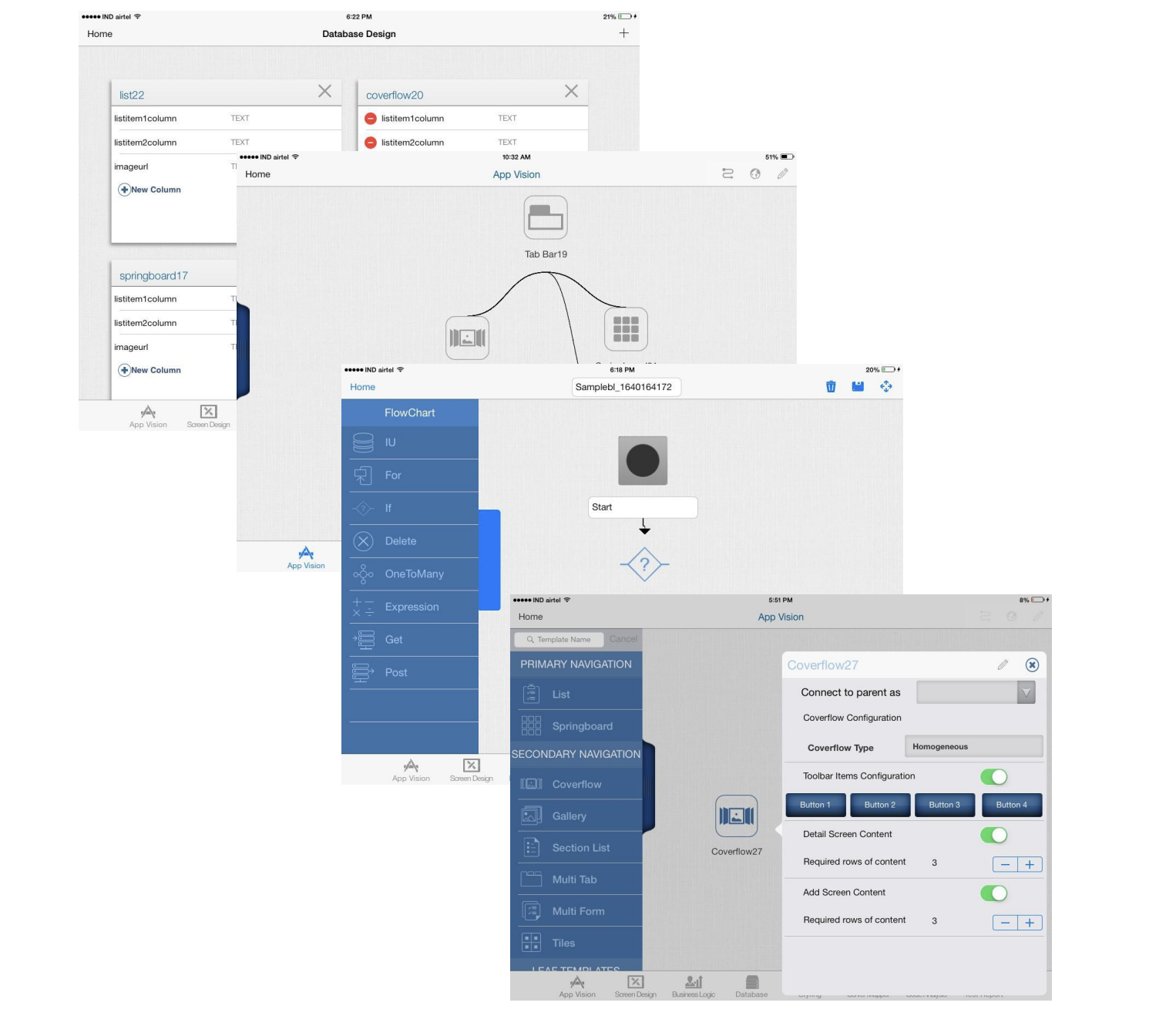
- Role
- User Experience Designer
- Duration
- 1 year
- Company
- Cognizant — Mobile Center of Excellence
- Domain
- Enterprise · No-Code · MADP
Problem statement
Native mobile development required teams to build and maintain two separate apps for Android and iOS because each platform enforced different UI guidelines. Even when the business logic, data, and workflows were identical, developers had to duplicate screens, navigation, and interactions to meet native standards. This doubled engineering effort and delivery timelines, and every OS update triggered another round of rework for both platforms. For a services organisation shipping multiple client apps, this model was costly, slow, and operationally inefficient.
Project objective
The goal was to design a Mobile Application Development Platform (MADP) that reduces the cost and complexity of native app delivery across Android and iOS. The platform needed to standardise reusable screen layouts, components, and interaction patterns so both developers and non-developers could assemble production-ready apps faster — without writing or rewriting native code for every engagement.
- Faster — collapse timelines for delivery-heavy projects that require minimal customisation.
- Cheaper — enable lean teams to ship without scaling headcount.
- Better — give developers new to mobile a safety net of baked-in standards, patterns, and guardrails.
Scope
🎯 In‑Scope
- Build a no‑code MADP to generate native iOS and Android apps.
- User onboarding + account management with a dashboard of published apps.
- Visual app builder using reusable templates, components, and interaction patterns.
- Data integration with internal databases.
- Logic builder for workflows and conditional actions.
- App‑store‑ready publishing meeting Apple/Google UI and interaction criteria.
- Responsive/adaptive design across breakpoints.
- Code export + editing for advanced users.
🚫 Out of Scope
To keep the platform focused and feasible, the following are explicitly excluded:
- Custom screen layouts beyond provided templates
- Integrations beyond internal databases and app stores
- Consumer‑facing use cases — platform is for internal B2B delivery teams
- Non‑native platform exports (e.g., web apps, desktop apps)
- Third‑party plugin marketplace
Business challenges
Platform differences — Android and iOS use different patterns for lists, errors, confirmations, navigation, and gestures, making one unified template system hard to generalise.
Template generalisation — 10+ layout families and 200+ screens had to be reduced into reusable templates without breaking native conventions.
OS changes mid‑project — iOS 8 introduced new UI standards, forcing re‑benchmarking and updates to layouts, icons, and interactions.
App store compliance — All generated apps needed to meet Apple HIG and Google Material guidelines to pass store review.
Breakpoint consistency — Templates had to adapt cleanly across mobile/tablet sizes and densities while staying platform‑native.
Design process
Product Definition & Design
- 1.01Defining problem
- 1.02Vision
- 1.03Market research
- 1.04Competitive analysis
- 1.05IA
- 1.06Interaction design
- 1.07Task flows
- 1.08Low‑fi prototypes
Research, Validation & Iteration
- 2.01Usability test plan
- 2.02Research protocol
- 2.03Test study brief
- 2.04Consolidation of findings
- 2.05Action points
- 2.06Prioritization workshop
- 2.07Future roadmap
- 2.08Reiterate
01
Market research
Benchmarking screen layouts - Studied the most frequently used screen layouts, interaction models and components across Android and iOS to propose a reusable, standardised template set. Reusable assets only work when they cover enough real-world variation without breaking platform conventions.
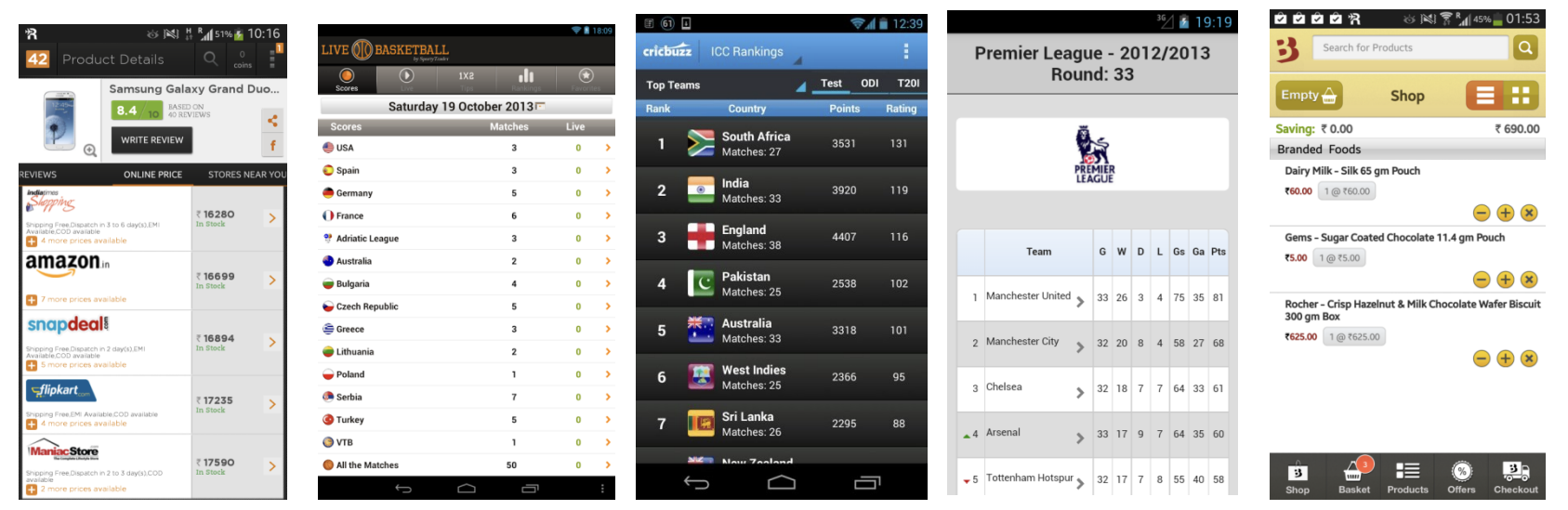
- 10+ screen layout families benchmarked across mobile and tablet.
- 200+ templates generalised into a reusable library.
- Standardised iconography drawn against Android and iOS guidelines.
02
User Personas
Mapped four distinct archetypes — each with their own goals, fluency and failure modes — so the builder could speak to all of them without flattening the experience.
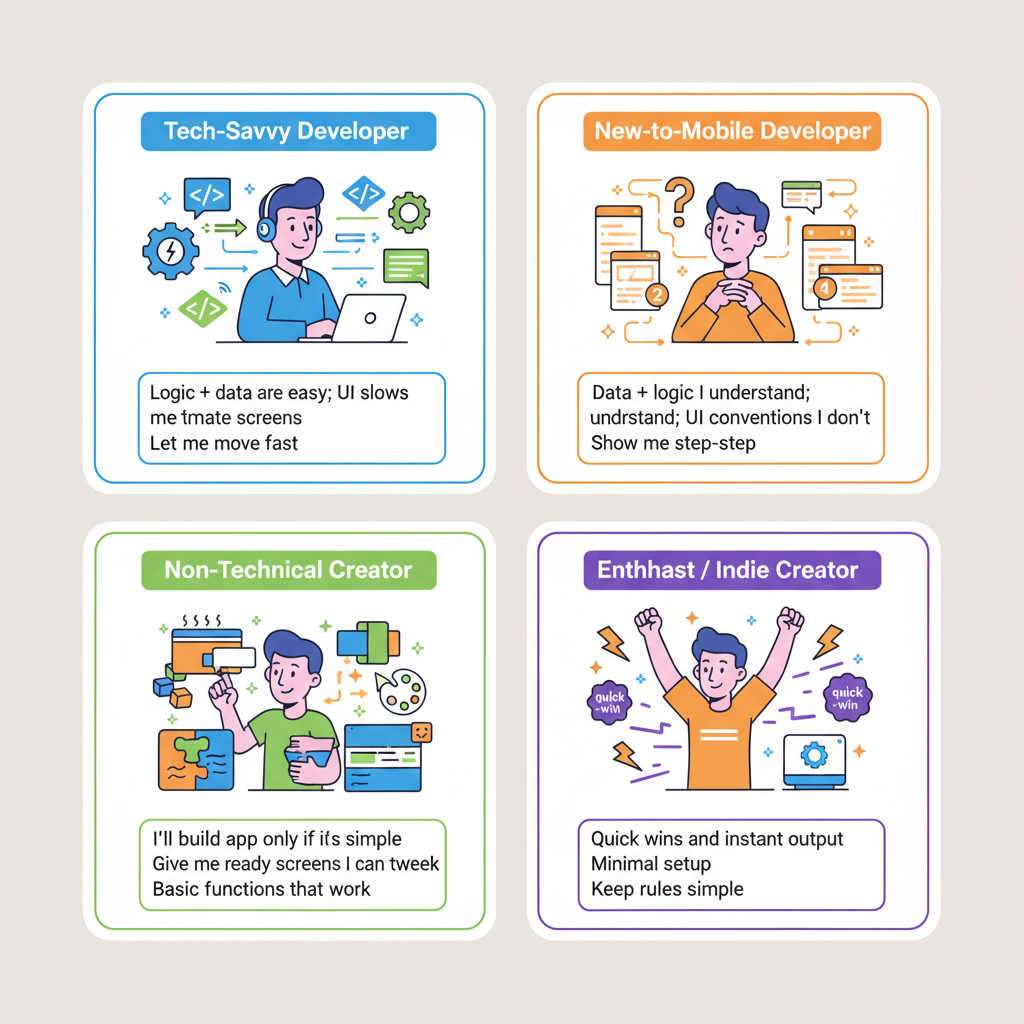
Tech‑Savvy Developer
Age 24 • IT • Works in an organization
- Rigid templates
- Slow setup
- Limited debugging
- API flexibility
- Git workflows
- Real‑time preview
New‑to‑Mobile Developer
Age 23 • IT • Works at a start‑up
- Layout issues
- Platform differences
- Unclear best practices
- Guided flows
- Templates
- Inline help
Non‑Technical Creator
Age 30 • Marketing • Works in an organization
- Data binding confusion
- Fear of breaking things
- Drag‑and‑drop UI
- Safe defaults
- Easy sharing
Enthusiast / Indie Creator
Age 30 • Event Planner • Self‑employed
- Hidden advanced features
- Slow iteration
- Instant preview
- Template gallery
- Simple analytics
03
Design Evaluation
Evaluated prototypes against a focused set of heuristics so reviews stayed grounded and consistent across the team.
- Visual hierarchy — does the design guide users to the most important elements?
- Consistency — is the design system applied consistently across the app?
- Navigational clues — cues that help users find their way through the interface.
- Heuristic checks — user control and freedom, error prevention, and help/documentation.
- User Testing — Task-based testing with moderated sessions and manual recordings, screen recordings.
04
User Research and testing
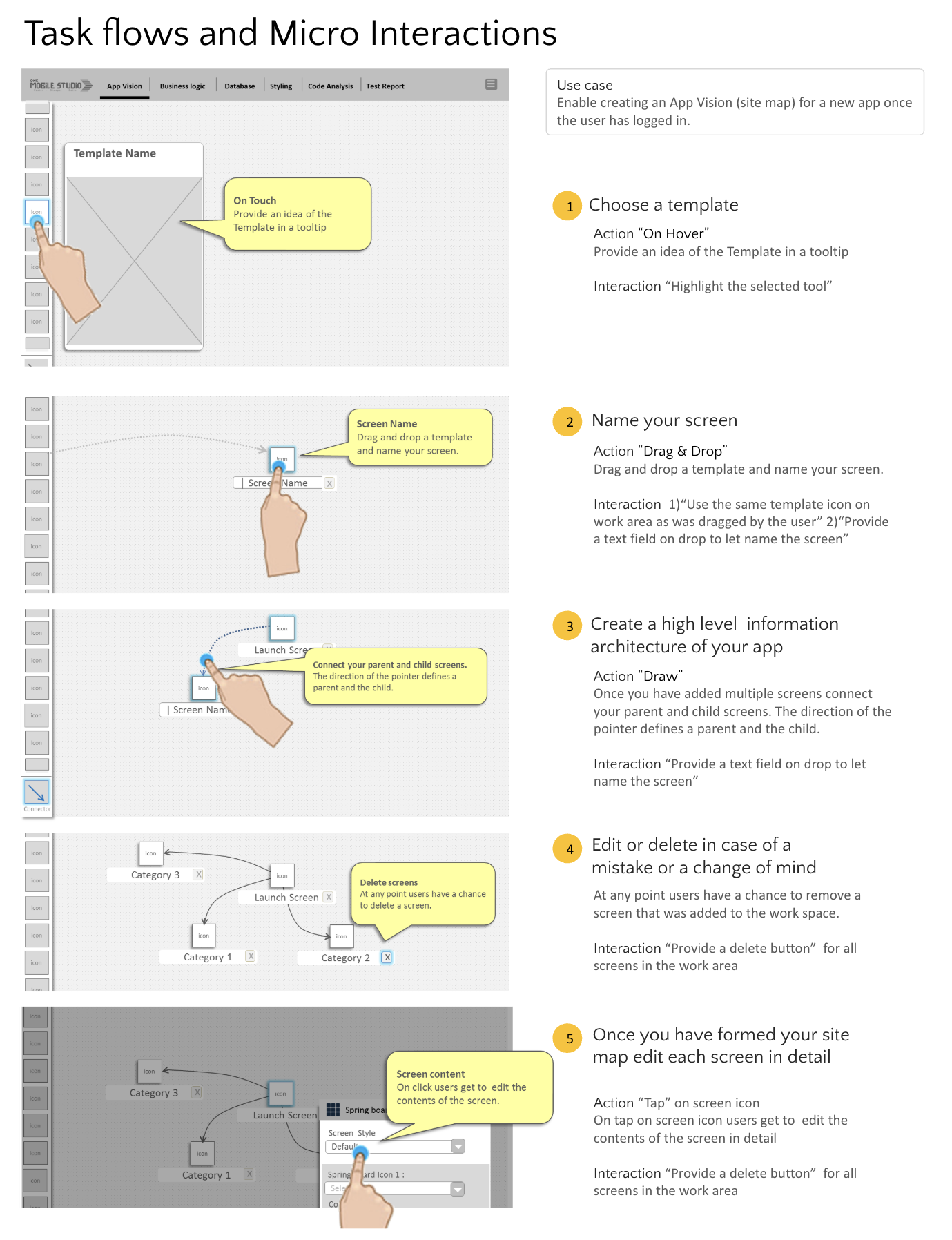
Asked the harder question first: what does a user think a 'no-code' builder will do for them? Mapped task flows around user goals across more channels and touchpoints than a single-screen tool would assume.
Three research methods were used to validate design decisions and uncover friction points before release.
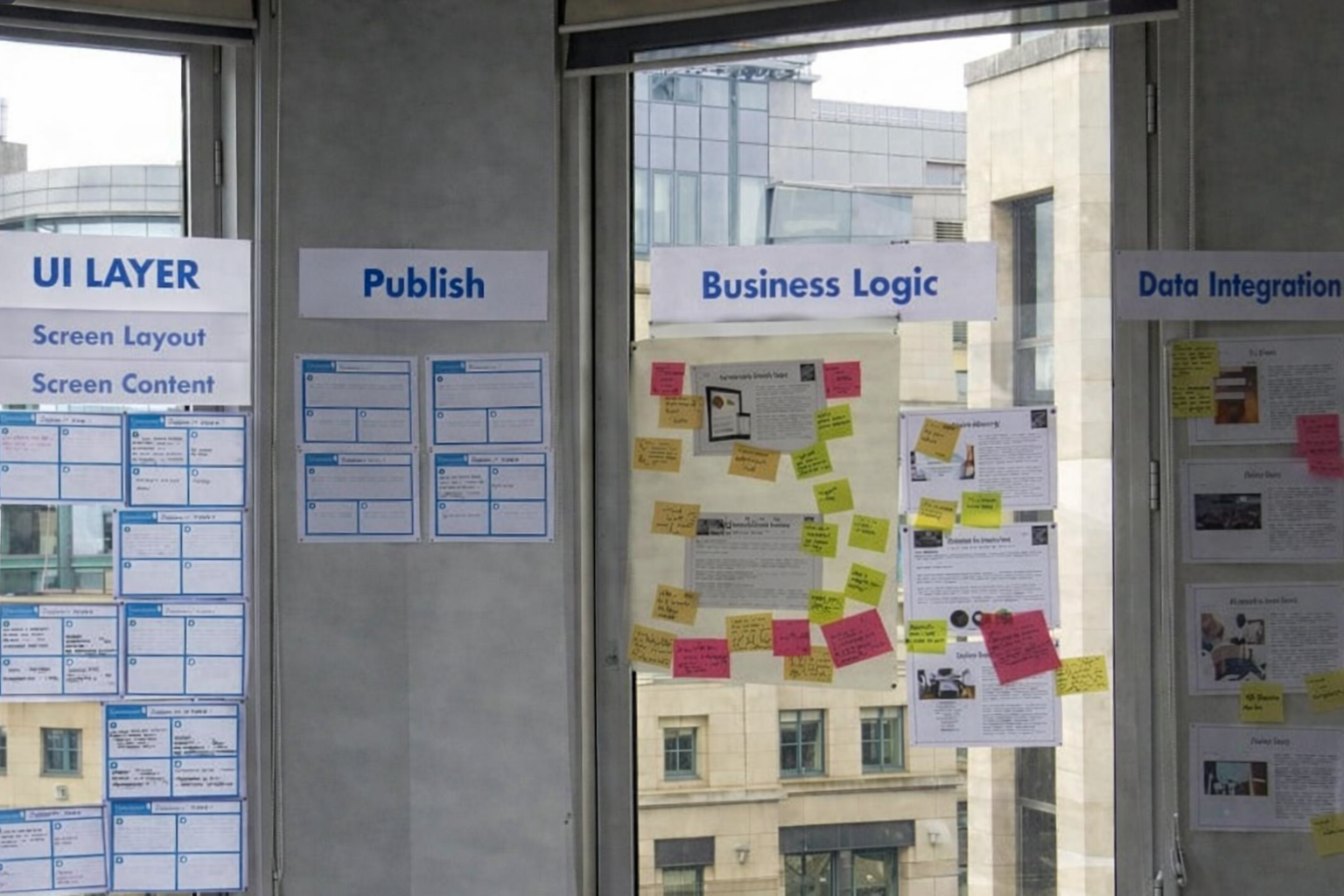
Once the product was usable, we ran an in-house hackathon to study behaviour in a dynamic, collaborative setting — problem-solving, teamwork, decisioning and creativity under real time pressure. Closer to the truth than any lab study.
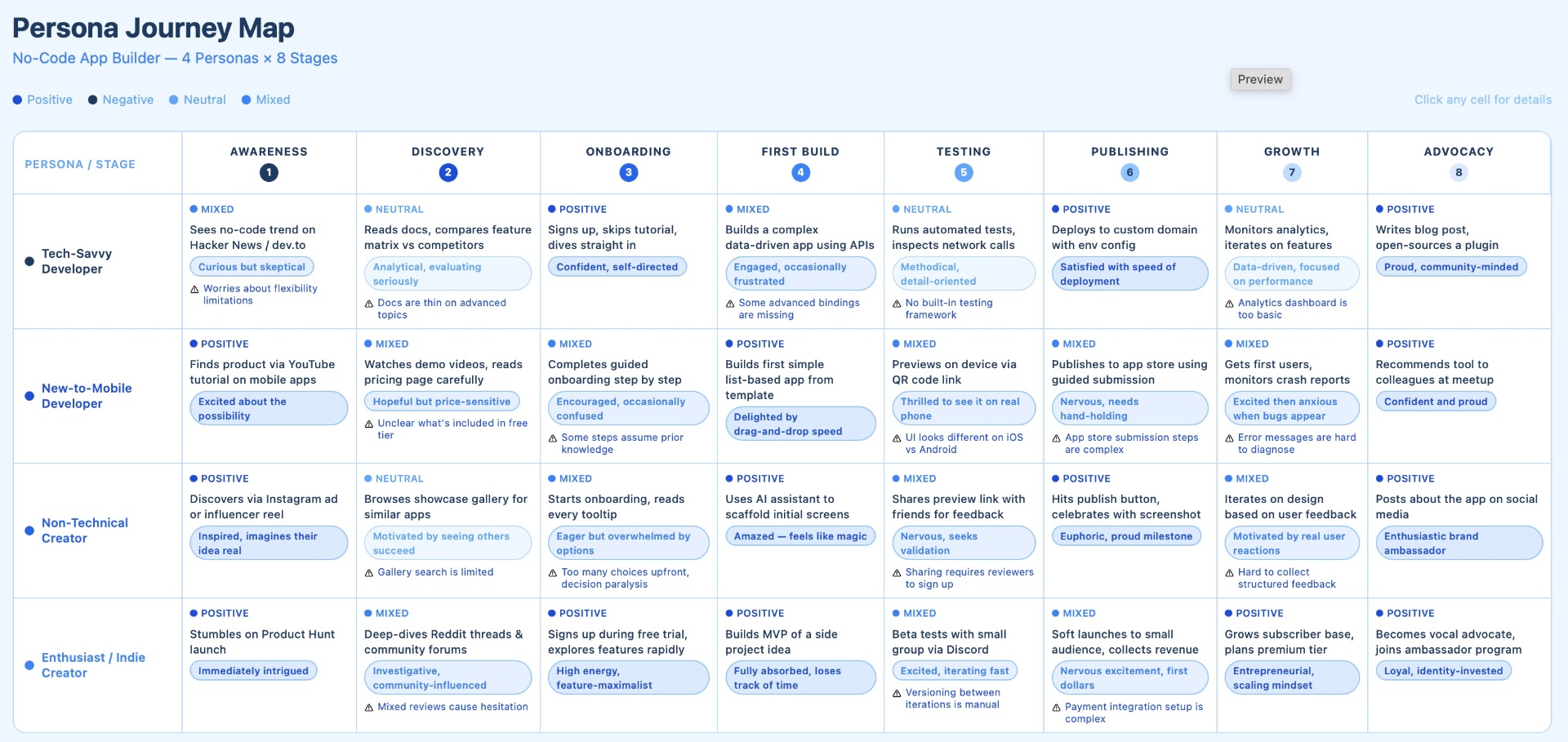
- Customer journey — Persona journey map across 4 personas and 8 stages (Awareness → Advocacy), capturing actions, sentiment and friction at each step.
- Observational Study — Group testing via hackathon format. Task completion walkthroughs evaluated for drop-off points, pain points, and design-induced inertia.
- Tracking & Analysis — Eye tracking and touch tracking to identify drop points and interaction gaps.
- In-house hackathon — think-aloud protocol with on-device screen recording and in-person observers on iOS and Android (iPad and Nexus). Task: build a simple restaurant menu app with categories, item detail, favourites and navigation.
03
The outcomes guiding project road map
Insight
App building is not just screens — users need to understand how data moves, and the tool has to teach that gradually.
Insight
Build confidence and competence step by step: introduce data integration, design, development and management as a sequence, not a buffet.
First-time users struggled the moment they moved past screens — styling and naming data tables exposed the cliff. Experienced users hit a different wall: the grid felt daunting and component alignment was harder than it needed to be.
The clearest insight: users systematically underestimated the complexity of business logic and database integration. Logical and physical data models intimidate beginners — so the platform has to introduce them gradually, with real-time guidance, bite-sized learning and hotspots that lead to high-value actions.
Designed immediate, clear responses to user actions so people could refine and complete tasks without second-guessing the tool. Small loops, consistently applied, did more for confidence than any onboarding tour.
What Worked
- Screen-first onboarding — Users (especially beginners) felt confident adding screens and moving through early UI steps.
- Logic + integrations for experts — Tech-savvy users moved quickly through data logic, API setup and publishing.
- Template-driven flow — Templates reduced friction for both beginners and experts, especially when UI automation kicked in.
- Clear sequencing — When the workflow followed design → data → logic → publish, users felt more in control.
What Didn't Work
- Data setup cliff — First-time users dropped off immediately when asked to style screens, name tables or understand data structures.
- Grid + alignment overhead — Experienced users found the layout engine slower than their natural pace.
- Underestimated complexity — Users assumed app building was 'just screens,' and were unprepared for data flow, logic and model decisions.
- Data models intimidated beginners — Logical vs physical models created confusion and hesitation.
- Unguided buffet of features — Presenting everything at once reduced confidence and increased cognitive load.
- App building is not just screens — users need to understand how data moves, and the tool has to teach that gradually.
- Build confidence and competence step by step: introduce data integration, design, development and management as a sequence, not a buffet.
04
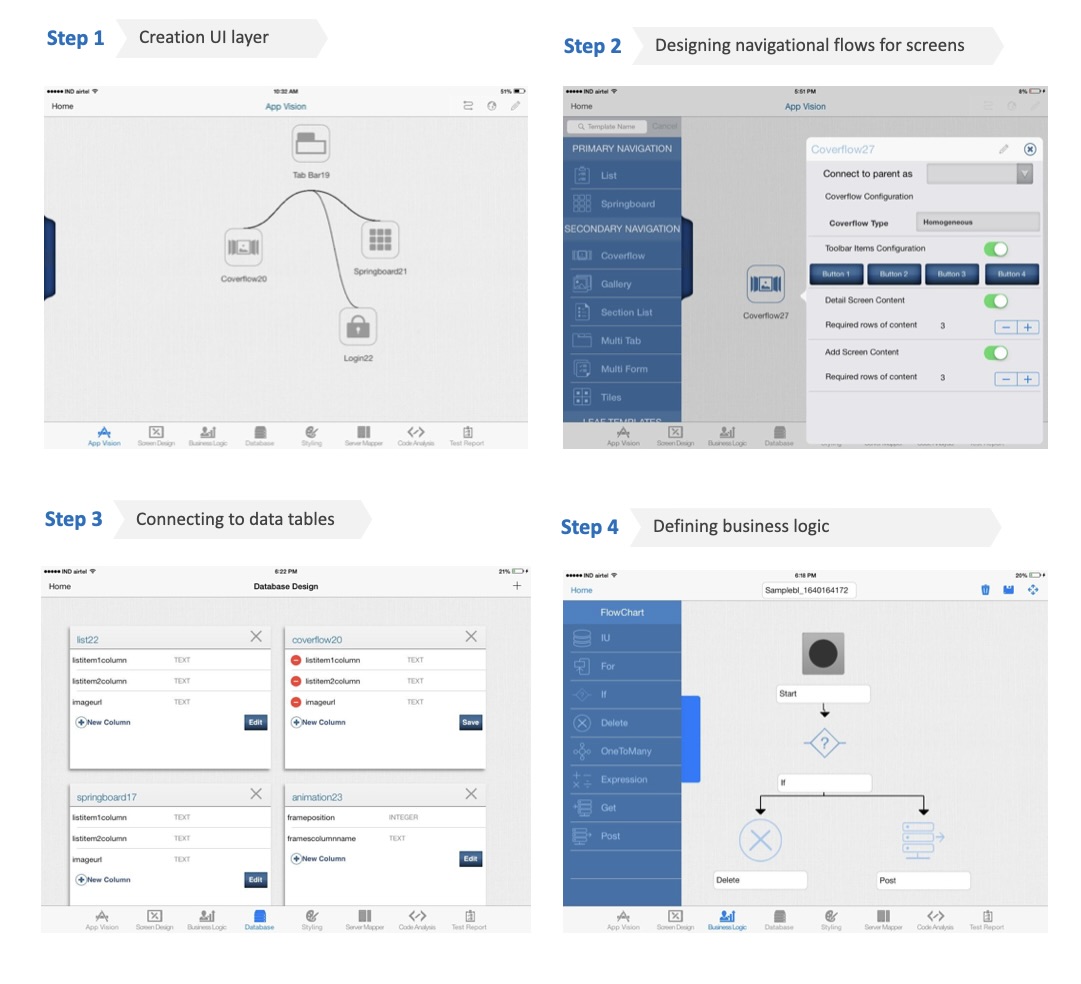
Prototypes
05
Success Metrics
80%
Drop in app creation time for apps using basic logic
70%
Reduction in Time to App Store / Play Store
80%
Cut in continuous delivery timelines for future app iterations
06
The Design Team
My contribution to this extensive project were recognised with Cognizant C&D's Associate of the Year award for— Project Delivery Excellence (2014).
Cross-functional team across user experience, visual design and market research — co-owning research, IA, visual language and benchmarking over the life of the project.
- Anjani Varma — User Experience Designer, User Researcher and Usability Evaluator (1 year).
- Sagar Irukula — Visual Designer and Visual Design Strategist (1.5 years).
- Vikas Kumar — Design Market Researcher, template benchmarking (4 months).
Keep reading
Other case studies
Working on a similar problem?
I take on senior contract, fractional and select full-time engagements where the brief is unclear and the stakes are real.
anjani.vc@gmail.com